Visualizzazione post con etichetta AX2012. Mostra tutti i post

giovedì 20 luglio 2017

AX2012: Force ROLE CENTER page to your custom page

In case of you don't have the Enterprise Portal installed or you system (or you don't want install it) but you want the show your own custom page to users on Role Center into Dynamics AX 2012, for example your intranet or sharepoint website, you can do it quite simple.

Attention: This is a not supported procedure, do it only for testing purpose

These are steps:

  • Create on localhost for example a WEBSITE and put inside a ASPX page


  • Comment out lines 11 and 12 on Form EPWebSiteParameters > Data Sources > WebSiteTable > InternalUrl > validate method


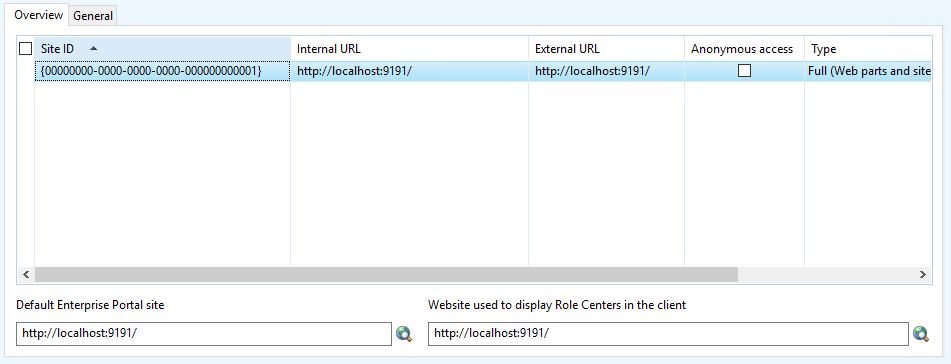
  • Insert your website inside enterprise portal configuration (System Administration > Setup > Enterprise Portal > WebSite)


  • Link your user to a EPRoleCenter Profile (System Administration > Common > Users > User profiles) for example Accountant
     
  • Modify method getCurrentUsersHomepageURLPath of ProfileManager class, comment out whole code and return your own ASPX page, for mine example default.aspx

  • Close Dynamics AX client and reopen it, now your role center page is your own page

The link can be something like this:
menuitemaction://CueRun+CueId=35637150593/

In this case the form related to Cue is opened

Links are catched by method processLink of SysHelp, refer to that class or standard rolecenter links for more information to create your own custom role page.


giovedì 5 gennaio 2017

HOWTO: Run a BATCH using x++ (Helps for debug batch's in a simple way)

On AX2012 batch run always over a CIL context.
For debugging a BATCH without attach Visual Studio to AOS instance you can run in this way:

1. Create the batch job and assing a batch group not managed by a batch server
2. Create this method on BatchRun class:

server static public void runJobStaticCodeIL(RecId batchId)
{
    container ret;
    XppILExecutePermission  xppILExecutePermission;
    ;

    xppILExecutePermission = new XppILExecutePermission();
    xppILExecutePermission.assert();

    ret = runClassMethodIL(classStr(BatchRun), staticMethodStr(BatchRun, runJobStaticCode), [batchId]);

    CodeAccessPermission::revertAssert();
}

3. On batch activity get the JOB ID
2. Run the follow script

static void batchRun(Args _args)
{
    Batch batch;
    ;
    select batch where batch.BatchJobId == 5637161890;
    BatchRun::runJobStaticCodeIL(batch.RecId);
}

Now you can debug it!

martedì 28 giugno 2016

TIP: Pay attention when use caching display methods on forms

A tipical performance tip is to put all display methods on datasource cache:
https://msdn.microsoft.com/en-us/library/aa596691.aspx

Using something like that on init method of datasource
this.cacheAddMethod(tableMethodStr(CustTable, Name));

Pay attention, the value of all cached methods is set when data is fetched from the back-end database. If you put a display method on a separated tab, not vibile when the form is opened, the method is called the same for each record of datasource when form start, causing a performance problem if the display method is complex. If you remove the method from the cache the display method is called only when the control appears to the user.

Than, add the method cache only if the control is visibile to the user into the main grid or main tab, otherelse assessed whether the performances have a real advantage.

giovedì 26 maggio 2016

HOWTO: Debug the AifOutboundProcessingService

If you need to go more in depth using debugging of an outbound you have to write down a couple of customization on standard code:

  • Comment out the runas method on AifOutboundProcessingService.runAsUserInPartition method and replace with a direct call to processAsUser method. 
/*
// runAs currentUser and process all messages in the container.
new RunAsPermission(runAsUserId).assert();

// BP deviation documented
runas(runAsUserId,
classnum(AifOutboundProcessingService),
staticmethodstr(AifOutboundProcessingService, processAsUser),
messageIdContainer,
runAsCompany,
'',
runAsPartition);

// Revert the permission
CodeAccessPermission::revertAssert();

*/

AifOutboundProcessingService::processAsUser(messageIdContainer);

Important: You have to run the code on the same company and partition specified on runAsCompany and runAsPartition parameter.
  • Comment out or o skip execution this line of code on AifDispatcher.dispatchOperation method
//new AifDispatcherPermission().demand();

For process the message queue use the new AifOutboundProcessingService().run() method

HOWTO: Create computed columns in Views on Dynamics AX 2012

Computed columns have been using in SQL server since many versions but this feature was available Dynamics AX since version 2012.
Follow steps described here to learn how to create view and walthrough the complete example to understand how can we add computed columns in AX 2012 Views. More examples can be found from here; http://daxmusings.codecrib.com/2011/10/computed-view-columns-in-ax-2012.html 

Well, here is an example which illustrates how can we add computed columns in a view with different logic.

Computed column; Returning Field in View
public static server str compAmount() { #define.CompView(SWProjForecastCost) #define.CompDS(ProjForecastCost) #define.CostPrice(CostPrice)
   return SysComputedColumn::returnField(tableStr(#CompView), identifierStr(#CompDS), fieldStr(#CompDS, #CostPrice)); }

Computed column; Converting UTC Date to Date in View
public static server str compDate() { #define.CompView(SWProjForecastCost) #define.CompDS(ProjForecastCost) #define.ActualDateTime(ActualDateTime) str sDateTime; sDateTime = SysComputedColumn::returnField(tableStr(#CompView), identifierStr(#CompDS), fieldStr(#CompDS, #ActualDateTime));
   return SysComputedColumn::fromUtcDateToDate(sDateTime); }

Computed column; Returning Enum Value in View
public static server str compGeneralTransType() {    return SysComputedColumn::returnLiteral(Transaction::ProjectInvoice); }

Computed column; Multiplying two coulmns and returning resultant from View
private static server str compTotalCostPrice()
{
   #define.CompView(SWProjForecastCost)
   #define.CompDS(ProjForecastCost)
   #define.QtyCol(Qty)
   #define.PriceCol(CostPrice)


   return SysComputedColumn::multiply(
           SysComputedColumn::returnField(
               tableStr(#CompView),
               identifierStr(#CompDS),
               fieldStr(#CompDS, #PriceCol)
           ),
           SysComputedColumn::returnField(
               tableStr(#CompView),
               identifierStr(#CompDS),
               fieldStr(#CompDS, #QtyCol)
           )
         );
}

Computed column; Case Statement in View
public static server str TransType()
{
   #define.CompDS(ProjForecastCost)
   #define.CompView(SWProjForecastCost)
   str ret;
   str ModelId = SysComputedColumn::returnField(identifierStr(SWProjForecastCost), identifierStr(ProjForecastCost), identifierStr(ModelId));
   ret = "case " + modelId +          " when 'Sales' then 'Forecast Sales' " +          " when 'Orders' then 'Forecast Orders' " +          " when 'Latest' then 'Forecast Latest' " +          " end";    return ret;
}


Case Statement for this view looks like in SQL server as below;

   CASE T2.MODELID
      WHEN 'Sales' THEN 'Forecast Sales'
      WHEN 'Orders' THEN 'Forecast Orders'
      WHEN 'Latest' THEN 'Forecast Latest' END

martedì 19 aprile 2016

X++: How to find what projects an object from the AOT exists in (Recursive)

To find out what projects an AOT object exists in, use this script.
It's recursive, than it can find methods or inner nodes too

ProjectNode projectNode;
ProjectListNode projectListNode;

TreeNode treeNode;
TreeNodeIterator treeNodeIterator;

// Object we are searching for
TreeNode tnSearch = TreeNode::findNode(@'\Classes\MHT_DOCF_MasterTable');

void find(TreeNodeIterator _innerTreeNodeIterator)
{
TreeNode innerTreeNode;
;
innerTreeNode = _innerTreeNodeIterator.next();
while (innerTreeNode)
{
if (innerTreeNode.treeNodePath() == tnSearch.treeNodePath())
info(strfmt("Found in shared project %1", treeNode.AOTname()));
find(innerTreeNode.AOTiterator());
innerTreeNode = _innerTreeNodeIterator.next();
}
}

;

projectListNode = SysTreeNode::getSharedProject();
treeNodeIterator = projectListNode.AOTiterator();

treeNode = treeNodeIterator.next();
while (treeNode)
{
projectNode = treeNode;
projectNode = projectNode.loadForInspection();
find(projectNode.AOTiterator());
treeNode = treeNodeIterator.next();
}

TIP: Error executing code: The field with ID '0' does not exist in table 'SysExtensionSerializerExtensionMap'.


If you ever get "Error executing code: The field with ID '0' does not exist in table 'SysExtensionSerializerExtensionMap'." error in CIL, it may happen it is the table extension framework + the standard buf2buf function to blame.

Somehow, if you pass a Map instead of a table to buf2buf function, the following line fails:

_to.(fieldId) = _from.(fieldId);
However, if you replace this line with:

fieldName = fieldId2name(_from.TableId, fieldId);
 _to.setFieldValue(fieldName, _from.getFieldValue(fieldName));

everything is fine both in X++ and in CIL.

P.S. I didn't dare to change the standard buf2buf method. Istead, I created another method and used it in the table extension framework logic, which failed because of the issue (\Data Dictionary\Maps\SysExtensionSerializerMap\Methods\copyExtensionTableData)


Reposted: https://community.dynamics.com/ax/b/dynamicsaxnotesonthecuffs/archive/2016/04/04/error-executing-code-the-field-with-id-39-0-39-does-not-exist-in-table-39-sysextensionserializerextensionmap-39

venerdì 8 aprile 2016

HOWTO: Delete Label Files from AX 2012

Here are the steps to delete Label Files from AX 2012:

  • Create a new model. You could call it "LabelsBeGone".
  • Open the AOT and move the Label File(s) you want to get rid of to the new model.
  • Close AX and stop the AOS.
  • Use AXUtil to delete the new model.
  • Delete the label files from the server folder; C:\Program Files\Microsoft Dynamics AX\60\Server\...\bin\Application\Appl\Standard
  • Start the AOS.
  • Skip the upgrade wizard.

venerdì 11 marzo 2016

DIXF: Field 'Entity' must be filled in on DIXF (AX2012)

On AX2012 CU9 or later, if found it on CU10 for example, if you got this error, you can RUN this scripts. Is an update script of CU9, the entity name is a new field inserted on this version.

ReleaseUpdateDB63_DMF releaseUpdateDB63_DMF = new ReleaseUpdateDB63_DMF();
releaseUpdateDB63_DMF.updateEntityType();


Or, more simple, you can delete all entities, when you reopen the entities form all entities will be created. I know, you don't belive me, but it works.

lunedì 22 febbraio 2016

HOWTO: Set translation of label on fly by code

Use this script to set the value and comment of an existing label only if this label not exist in a particolar language. You can use it on fly by code whitout use of developer tool.
In my case i can set more than 200+ labels traduction in a couple of minutes.

void modifyLabel(LabelId _labelId, str _srcLanguage, str _trgLanguace, str _trgString, str _trgComment = '')
    {
        SysLabel      srcLang = new SysLabel(_srcLanguage);
        SysLabel      trgLang = new SysLabel(_trgLanguace);

        ;
        _labelId = "@" + _labelId;
        if (!srcLang.exists(_labelId) || !srcLang.extractString(_labelId))
        {
            warning(strfmt("L'etichetta %1 non esiste nella lingua %2", _labelId, srcLang.languageId()));
            return;
        }

        if (trgLang.exists(_labelId) && trgLang.extractString(_labelId))
        {
            warning(strfmt("L'etichetta %1 esiste già nella lingua %2 con il valore %3", _labelId, trgLang.languageId(), trgLang.extractString(_labelId)));
            return;
        }

        cnt += trgLang.modify(_labelId, _trgString, _trgComment ? _trgComment : srcLang.extractComment(_labelId));
        info(strFmt("Modificata etichetta %1 e impostato il testo %2 in lingua %2", _labelId, _trgString));
    }

This script can semplify the same action but in more than one language, example in my case the traduction of en-us and en-gb is the same.

    void modifyLabelMultipleLanguagese(LabelId _labelId, str _srcLanguage, container _trgLanguaces, str _trgString, str _trgComment = '')
    {
        int i;
        str trgLanguace;
        ;
        for(i=1;i<=conlen(_trgLanguaces);i++)
        {
            trgLanguace = conpeek(_trgLanguaces, i);
            modifyLabel(_labelId, _srcLanguage, trgLanguace, _trgString, _trgComment);
        }
    }

martedì 7 aprile 2015

HOWTO: Merge ledger and financial dimensions using X++ code

To merge two or more financial dimensions use this script.
DimensionDefaultingService::serviceCreateLedgerDimension(ledgerDimension,customerDefaultDimension);
You can merge more  than 2 dimension, infact you case specify some default dimensions to merge

ISSUE: Standard view is displayed as table in AOT on AX2012

Today I found a strange error in the development environment, do not know what was the triggering event but a standard view become visible under table node and the syncronization failed.

From research I found this post:
http://community.dynamics.com/ax/f/33/t/118864.aspx

and then another post with a more in-depth: http://community.dynamics.com /ax/f/33/p/119471/249240.aspx?WT.mc_id=ForumPost#249240

In my case I solved using a direct SQL patch way.

The solution is to restore the table properties on model database coping it from another standard model store or as in my case the production env database.

1. Stopped the dev AOS
2. Removed from the table SQLDictionary any object references
3. Removed from the database the view refers to object (check if there are a table also)
4. Check the object properties on the model database:

SELECT m.ElementType, m.Name, m.AxId, md.LayerId, manifest.DisplayName, md.Properties as Metadata
              FROM [dbo].ModelElement AS m
              INNER JOIN [dbo].ModelElementData AS md
                             ON m.ElementHandle = md.ElementHandle
              INNER JOIN [dbo].ModelManifest AS manifest
                             ON md.ModelId = manifest.ModelId
              AND m.ElementType = 44 AND m.Name = 'DirPartyLookupGridView'

5. Check the object properties on the other model database:

SELECT m.ElementType, m.Name, m.AxId, md.LayerId, manifest.DisplayName, md.Properties as Metadata
              FROM MicrosoftDynamicsAXBaseline.[dbo].ModelElement AS m
              INNER JOIN MicrosoftDynamicsAXBaseline.[dbo].ModelElementData AS md
                             ON m.ElementHandle = md.ElementHandle
              INNER JOIN MicrosoftDynamicsAXBaseline.[dbo].ModelManifest AS manifest
                             ON md.ModelId = manifest.ModelId
              AND m.ElementType = 44 AND m.Name = 'DirPartyLookupGridView'
6. Update the object properties coping it from the other model database:

Update md Set md.Properties = md_base.Properties
FROM [dbo].ModelElement AS m
              INNER JOIN [dbo].ModelElementData AS md
                             ON m.ElementHandle = md.ElementHandle
              INNER JOIN MicrosoftDynamicsAXBaseline.[dbo].ModelElement AS m_base
                             ON m.ElementType = m_base.ElementType AND m.Name = m_base.Name
              INNER JOIN MicrosoftDynamicsAXBaseline.[dbo].ModelElementData AS md_base
                             ON m_base.ElementHandle = md_base.ElementHandle
AND m_base.ElementType = 44 AND m_base.Name = 'DirPartyLookupGridView' AND md_base.LayerId = 0

WARNING: Use the script on your own risk and evalute the impact on you env and warranty

lunedì 30 marzo 2015

HOWTO: Preview parts and surrogate keys in Ax2012


This post is a quick walk-through of surrogate keys, replacement keys, and field preview parts, which are new concepts in Ax2012.

The requirement used in this example is as follows:
  • Have a new field on the sales order header called 'Priority'.
  • This should point to a user-configurable table, containing a priority code and description.

Before we start there are a couple of terms you need to understand:
  • Natural key. Think of this as the primary key that makes the most sense. eg CustTable.AccountNum and InventTable.ItemID. We can ignore the effect of DataAreaID for non-shared tables for now.
  • Surrogate key. The surrogate key in database terms refers to a field that also uniquely identifies a record, but isn't a natural selector. When looking at Ax, this is the RecID. In other systems this could be a sequential number, or GUID. Typcially, it's something created by the database itself, like an identity column, however in Ax it's managed by the kernel.
  • Primary key. The unique primary key should point to either the natural key, or the surrogate key.
  • Clustered index. This affects the physical layout of records in the database. This doesn't have any real functional impact, but you do need to be very careful when selecting the clustered index as it can have a serious effect on performance if setup incorrectly.
These aren't new concepts - Wikipedia has tonnes of information on general database theory. One of the main changes in Ax2012 is that it more heavily promotes the use of the surrogate keys when relating tables. This is something that was always used in Ax, but more often when we had general-purpose tables, such as document-handling entries/misc. charge lines, that pointed to different types of records. Now you'll find that in a lot of places when two tables are related it's by the RecID instead of the natural key.
Ax also has the concept of the Replacement key. This is used to indicate which fields are displayed on the UI, regardless of the table's primary key. 

Creating the objects

First we create the basic datatype and table structure:
  • Create an extended data type (string) called SalesPriorityID. This will be the priority 'code' displayed on forms.
  • Create table SalesPriority.
  • Add types SalesPriorityID and Description to the table.
  • Create index SalesPriorityIdx containing field SalesPriorityID. Set AllowDuplicates to No, and AlternareKey to Yes. Note than an index cannot be designated as a table's alternate key unless it's unique.
  • In the table properties, you'll notice that the PrimaryIndex and ClusterIndex have already been set to SurrogateKey. You'll also notice that the CreateRecIdIndex table is set to Yes and locked for editing. 
  • Set the ReplacementKey to SalesPriorityIdx. This indicates to Ax that even though our primary key is SurrogateKey (automatic index on RecID), we want the priority code displayed on forms. 

Now we have a basic table with a primary key (on RecID), and unique replacement key (on SalesPriorityID). To reference this table using the RecID, we need a new extended data type:
  •  Create an extended data type (Int64) called SalesPriorityRefRecID. Make sure this extends RefRecID.
  • Set the ReferenceTable property to SalesPriority.
  • Under the Table References node, set it so that SalesPriorityRefRecID = = SalesPriority.RecID.
Don't forget to extend RefRecID. It looks like if you forget to do this, the replacement key functionality doesn't work correctly, even if the data-type is Int64. 
So we now have a table, and an extended data type that references it, via the RecID. All we have to do is drag this field onto SalesTable. You'll notice that when we do this, Ax prompts you to automatically create a relationship based on the EDT reference. Click yes. Rename the field to SalesPriority.

The field can now be dragged from the form data-source onto the design as normal. You'll see that instead of adding an Int64 control, it adds a reference, since Ax has determined the relations automatically. When a reference group is shown on the form, it will display the value of the alternate/replacement key instead of the underlying RecID pointing to the SalesPriority table. I added the field to the 'Status' group, shown below:


In the underlying SalesTable record, the field SalesPriority points to SalesPriority.RecID, but displays the value of SalesPriorityID since it's contained in the nominated Replacement key.

Adding a preview part

I won't go into too much detail here, but the idea is to add a preview to the field, which acts as a sort of extended tool-tip:


The basic steps are:

  • Create form SalesPriorityPreview. Add table SalesPriority as a datasource, setting allow edit/add/delete to false. Add fields directly onto the design.
  • Create FormPart of the same name and set the Form property.
  • Create a display menu-item of the same name, pointing to the FormPart.
  • On the SalesPriority table, set property PreviewPartRef to the menu item.

Now when you hover the priority value on the sales order form, you'll see your preview form popup automatically.

There's plenty of information on this - Another good post on the subject can be read here, and of course the MSDN.

AX 2012: The request was aborted: Could not create SSL/TLS secure channel

The error you're encountering, "The request was aborted: Could not create SSL/TLS secure channel," can occur due to various re...