mercoledì 27 gennaio 2021

D365FFO: Start a Virtual Machine (Cloud hosted) using Powershell

The simplest way to wake up and start a cloud hosted virtual machine from your commmand line.

The authentication method is prompted login, but you can autheticate using another method as mentioned here: https://docs.microsoft.com/en-us/powershell/module/azurerm.profile/connect-azurermaccount?view=azurermps-6.13.0

1. Run powersheel

2. Connect-AzureRmAccount

3. Start-AzureRmVM -ResourceGroupName "yourresourcegroupname" -Name "maschineName"

More info here: https://docs.microsoft.com/en-us/powershell/module/azurerm.compute/?view=azurermps-6.13.0#virtual-machines

venerdì 22 gennaio 2021

D365FFO: Export data entity by code X++

 This is the code for exporting data entity using X++

Note: Export is done using batch job, consider it in case of used that on a performance requirement implementation

try
{
EntityName entityName = DMFEntity::findFirstByTableId(tableNum(VendVendorV2Entity)).EntityName;

Query query = new Query(DMFUtil::getDefaultQueryForEntity(entityName));
QueryBuildDataSource qbds = query.dataSourceTable(tableNum(BankPositivePayExportEntity));
DMFEntityExporter exporter = new DMFEntityExporter();
fileId = exporter.exportToFile(entityName,
definitionGroupName,
'', //Optional: ExecutionID
"CSV", //Optional::SourceName
#FieldGroupName_AllFields, //Optional field selection
query.pack(), //Optional: Filtered Query
curExt() //Optional: DataAReaId
);

if (fileId != '')
{
str downloadUrl = DMFDataPopulation::getAzureBlobReadUrl(str2Guid(fileId));

Filename filename = strFmt('export.csv');
System.IO.Stream stream = File::UseFileFromURL(downloadUrl);
File::SendFileToUser(stream, filename);
}
else
{
throw error("DMF execution failed and details were written to the execution log");
}
}
catch
{
error("error occurred while exporting");
}

venerdì 5 gennaio 2018

D365FFO: System.InvalidOperationException. Only properties of simple type can be key properties.

Actually there is a Know BUG if you use ODATA references from NUGET.


If a data entity has an enum type field on the entity primary key, the system will report this error:


An unhandled exception of type ' System.InvalidOperationException' occurred in Microsoft.OData.Client.dll
Additional information: The key property 'Type' on for type
'ProductsApp4.Microsoft.Dynamics.DataEntities.LegalEntityContact' is of
type 'System.Nullable`1[[ProductsApp4.Microsoft.Dynamics.DataEntities.LogisticsElectronicAddressMethodType, ProductsApp4, Version=1.0.0.0, Culture=neutral, PublicKeyToken=null]]', which is not a simple type. Only properties of simple type can be key properties.


To resolve the issue, remove NUGET references from the project and use this custom OData dlls: in https://github.com/Microsoft/Dynamics-AX-Integration/tree/master/Packages


Pay attention if you are installing client on OS is Win7 x64 or Vista x64 and you got an error something like that:


{"Could not load file or assembly 'TheAssemblyYouHaveReferenced' or one of its dependencies. Strong name validation failed. (Exception from HRESULT: 0x8013141A)":"TheAssemblyYouHaveReferenced'}


Refer to this article: https://blogs.msdn.microsoft.com/keithmg/2012/03/20/strong-name-validation-failed-exception-from-hresult-0x8013141a/

giovedì 4 gennaio 2018

D365FFO: The underlying connection was closed: An unexpected error occurred on a send when try to connect ODATA to UAT or PROD report error

As reported here https://community.dynamics.com/ax/f/33/t/227417

When you try to connect to UAT or PROD environement using ODATA the system will report this error: The underlying connection was closed: An unexpected error occurred on a send

Adding this line of code on connection

System.Net.ServicePointManager.SecurityProtocol = System.Net.SecurityProtocolType.Tls12;

venerdì 22 dicembre 2017

D365FFO: Importing customers using data entity does not init value from customer group

Importing customers using dataentity does not init data from customer group, for example Payment Terms does not automatically inizialized from group.

This extension on CustCustomerEntity data entity will fix that problem

[ExtensionOf(dataentityviewstr(CustCustomerEntity))]
final class CustCustomerEntity_Extension
{
    [DataEventHandler(tableStr(CustCustomerEntity), DataEventType::MappedEntityToDataSource)]
    public static void CustCustomerEntity_onMappedEntityToDataSource(Common _sender, DataEventArgs _eventArgs)
    {
        CustCustomerEntity custCustomerEntity = _sender;
        DataEntityContextEventArgs dataEntityContextEventArgs = _eventArgs;

        DataEntityDataSourceRuntimeContext _dataSourceCtx = dataEntityContextEventArgs.parmEntityDataSourceContext();
        if (_dataSourceCtx.name() == dataEntityDataSourceStr(CustCustomerEntity, CustTable))
        {
            CustTable custTable = _dataSourceCtx.getBuffer();
            custTable.initFromCustGroup(CustGroup::find(custTable.CustGroup));
        }
    }
}

Apply to D365FFO Platform Update 11 Spring 2017

giovedì 20 luglio 2017

AX2012: Force ROLE CENTER page to your custom page

In case of you don't have the Enterprise Portal installed or you system (or you don't want install it) but you want the show your own custom page to users on Role Center into Dynamics AX 2012, for example your intranet or sharepoint website, you can do it quite simple.

Attention: This is a not supported procedure, do it only for testing purpose

These are steps:

  • Create on localhost for example a WEBSITE and put inside a ASPX page


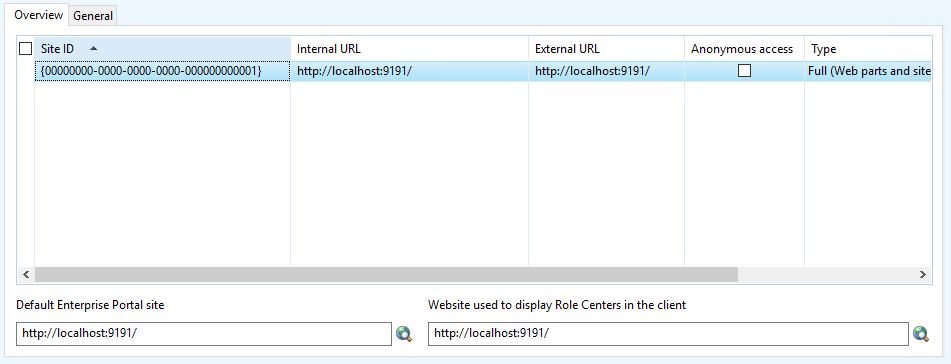
  • Comment out lines 11 and 12 on Form EPWebSiteParameters > Data Sources > WebSiteTable > InternalUrl > validate method


  • Insert your website inside enterprise portal configuration (System Administration > Setup > Enterprise Portal > WebSite)


  • Link your user to a EPRoleCenter Profile (System Administration > Common > Users > User profiles) for example Accountant
     
  • Modify method getCurrentUsersHomepageURLPath of ProfileManager class, comment out whole code and return your own ASPX page, for mine example default.aspx

  • Close Dynamics AX client and reopen it, now your role center page is your own page

The link can be something like this:
menuitemaction://CueRun+CueId=35637150593/

In this case the form related to Cue is opened

Links are catched by method processLink of SysHelp, refer to that class or standard rolecenter links for more information to create your own custom role page.


giovedì 5 gennaio 2017

HOWTO: Run a BATCH using x++ (Helps for debug batch's in a simple way)

On AX2012 batch run always over a CIL context.
For debugging a BATCH without attach Visual Studio to AOS instance you can run in this way:

1. Create the batch job and assing a batch group not managed by a batch server
2. Create this method on BatchRun class:

server static public void runJobStaticCodeIL(RecId batchId)
{
    container ret;
    XppILExecutePermission  xppILExecutePermission;
    ;

    xppILExecutePermission = new XppILExecutePermission();
    xppILExecutePermission.assert();

    ret = runClassMethodIL(classStr(BatchRun), staticMethodStr(BatchRun, runJobStaticCode), [batchId]);

    CodeAccessPermission::revertAssert();
}

3. On batch activity get the JOB ID
2. Run the follow script

static void batchRun(Args _args)
{
    Batch batch;
    ;
    select batch where batch.BatchJobId == 5637161890;
    BatchRun::runJobStaticCodeIL(batch.RecId);
}

Now you can debug it!

AX 2012: The request was aborted: Could not create SSL/TLS secure channel

The error you're encountering, "The request was aborted: Could not create SSL/TLS secure channel," can occur due to various re...